
Three ways to fix the clock
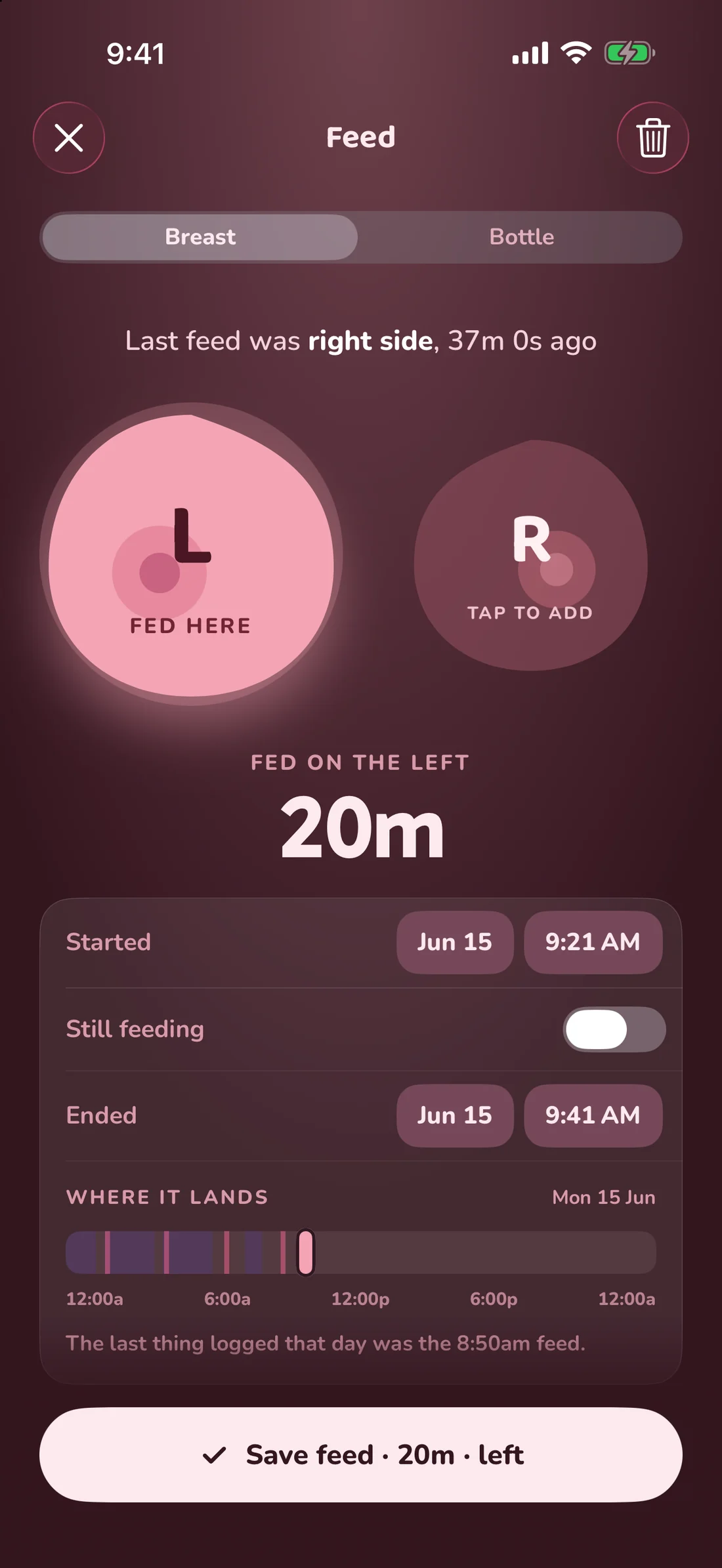
- Switch the timer off. Feed, Sleep, Tummy time and Pumping each carry the same switch under the clock. Off, an end time appears below the start; on a feed you also tap the side, or both, that she fed on.
- Start in the past. The + on the Sleep and Feeds pages opens the same sheet with the switch already off, so nothing runs even for a moment.
- Correcting a running timer. A feed or nap you started late can have its start moved backwards without ending and re-logging it — the elapsed time recalculates.
See where it lands before you save
A time typed from memory is easy to get wrong, so with the switch off the sheet shows her whole day as one bar: naps as blocks, feeds as ticks, and the entry you are writing on top. The line under it names what was logged either side — “nothing was logged between the 7:17am nap and the 8:31am change” — and if the times cover something she could not have been doing at the same moment, like a feed inside a nap, it says that too.
Logging by sentence
Ask is a logging path as well as a question box. Typing “bottle 90ml an hour ago” creates the entry at the right time; “nap 1.30 to 2.45” creates the sleep with both ends set. It is the fastest way to catch up a whole afternoon you spent away from your phone, and it is also how a carer’s text message becomes entries in the log.
Why backdating matters more than it sounds
Every pattern the app shows you — the wake windows, the night score, the weekly digest, her nap forecast — is computed from the times on the entries. An entry filed at the wrong hour does not just look untidy, it moves the forecast. Setting the real times is what keeps the rest honest.